 MoonGit
How to find the failed step in GitHub Actions
Trace a failing check from commit to run, job, and step. See how to verify the exact attempt and confirm that a follow-up commit fixes it.
To find a failed GitHub Actions step, identify the commit first, then open the matching workflow run, select the failed job, and expand the failing step. That order matters when a branch has newer commits, the workflow has a test matrix, or someone already reran part of the workflow.
Start from the SHA you need to fix
Suppose a pull request shows a failed build. Copy the SHA from the failed check or run summary. For a local branch tip, git rev-parse HEAD gives you its ID. Compare that ID with the workflow run you’re opening. A pull-request workflow can run against a generated merge commit, so use the SHA shown for the failing run when checking its details.
In MoonGit, select the relevant commit in the graph and open its CI details. A connected provider account and access to the repository are required to load private workflow details. Last known status is a saved result. Check its timestamp and refresh before concluding that the latest attempt failed. If MoonGit can’t show the run details, use the pull request or the provider’s workflow page.
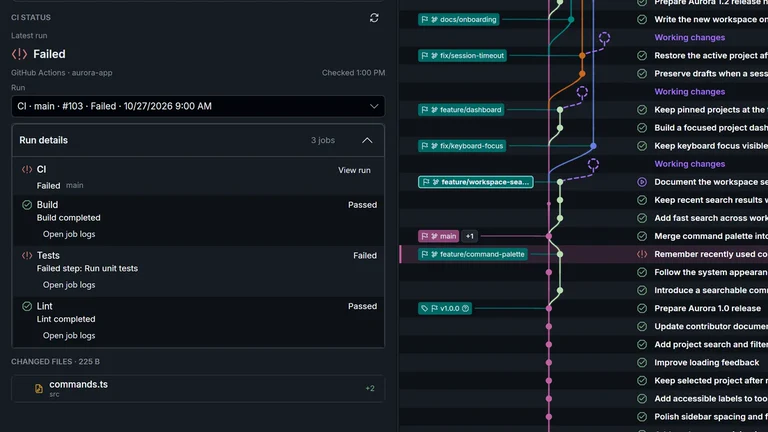
Open the failed job and the matching attempt
A workflow can fan out into several jobs, such as test (windows-latest) and test (ubuntu-latest). Keep the failing matrix entry’s platform or runtime with the error. In MoonGit, select the failed job and step if the provider exposes them, then open the provider logs for the full output. In GitHub, use Actions, select the run, pick the attempt and job, and expand the failing step.
If you have the GitHub CLI configured and the run ID, the following is an alternative. Substitute the IDs from the actual run and job.
gh run view <run-id> --verbose
gh run view --job <job-id> --log
Look above the final exit code for the first actionable failure. It could be a failed assertion, a missing file, or an install error. A line such as Process completed with exit code 1 tells you the command failed. The lines leading up to it explain what to investigate.
Confirm the fix against the same job
For example, a step that runs test -f status.txt in Bash exits with failure if the file is absent from its working directory. Check the workflow’s directory and the files committed at the failing SHA before changing the test. In a Bash checkout of the same revision, you can run the same command from the same directory. If the file exists locally only as an untracked file, CI still won’t receive it in a fresh checkout.
Once you have a candidate fix, check that the new run matches the new SHA and that the previously failing matrix job and step pass. Rerunning an old job can help reproduce a transient failure, but it still exercises the old run’s revision.
See MoonGit’s CI guide, the failed CI walkthrough, and GitHub’s workflow log documentation.