 MoonGit
How Git LFS tracking works in .gitattributes
Add a Git LFS pattern, verify that it matches an exact file, and check that Git staged a pointer before you commit or push.
Git LFS uses rules in .gitattributes to select paths. Git stores a small pointer in the commit for a matching asset, and the file contents live in LFS storage. Commit the rule so everyone on the branch gets the same path matching.
The important check is whether the exact path you intend to stage has the lfs filter and whether the staged blob is a pointer.
Add a rule and check the path
Start with Git LFS installed and a remote that supports it. The example tracks Photoshop files and adds a new asset at assets/cover.psd. Run these commands from the repository root.
git lfs install --local
git lfs track "*.psd"
git check-attr filter diff merge text -- assets/cover.psd
git add .gitattributes
Quoting the pattern passes it to Git LFS without expanding it in the shell. The first attribute from git check-attr should be filter: lfs. A typical generated line is *.psd filter=lfs diff=lfs merge=lfs -text. If the filter is unset or different, check the spelling, directory scope, and other applicable attribute rules. If you want the filter to match only one file, preview an exact path rule instead of applying the extension to the entire repository.
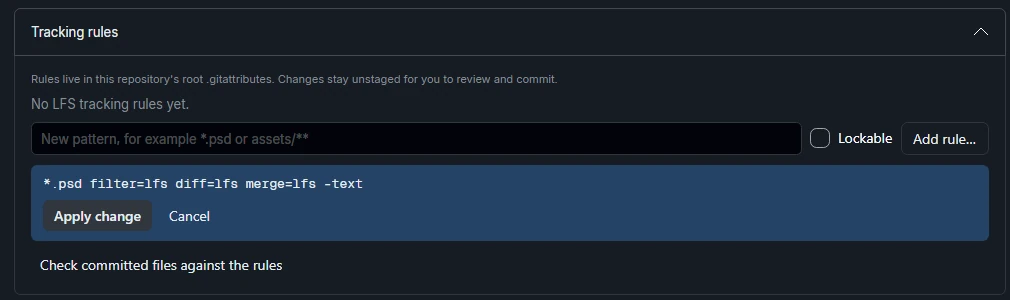
Review the rule and the staged pointer
After you have placed the new asset at the example path, add it and inspect what Git has in the index. Run the final command only after checking the filter, with a known LFS asset. git cat-file -s is a quick way to check the staged blob size first.
git add -- assets/cover.psd
git diff --cached -- .gitattributes
git cat-file -s ':assets/cover.psd'
git show ':assets/cover.psd'
git lfs status
An LFS pointer is a short text blob with a specification URL, an object ID, and a size. Review the .gitattributes change and asset together before committing. Once you push, verify that the remote has the LFS object. For an important repository, a fresh checkout with Git LFS installed gives you an end-to-end check.

Handle files that were already committed
An added rule has no effect on earlier commits. If you need an existing file to use LFS from the next commit forward, re-stage that path with git add --renormalize -- assets/cover.psd and verify the pointer again. A history migration is a separate operation that can replace published commit IDs. Plan it with the team and check the remote’s LFS permissions and limits first.
LFS locks are also separate from tracking. A lock can coordinate edits to an asset when the host supports locks. It does not tell you whether a path has the right attributes or whether the LFS object was uploaded.
See MoonGit’s Git LFS guide, the staging guide, and the Git LFS project’s setup and migration notes.