 MoonGit
Git squash vs fixup: Clean up commits before review
Use interactive rebase to combine follow-up commits. See how squash and fixup differ when the changes are the same and the commit messages are different.
Choose squash when a follow-up commit contains a message you want to consider in the final commit. Choose fixup when the follow-up contributes changes and you want to keep the earlier message. Both fold the changes into the preceding commit or group. The default actions differ in what happens to the messages.
Use this on a branch you control before sharing it for review. Rebase rewrites the affected commit IDs. For a shared branch, coordinate with the people who already based work on that history.
Decide what the final history should say
Imagine the first three commits after main are these, oldest first.
| Commit | Action | Reason |
|---|---|---|
Add search |
Pick | Keep the search feature as one reviewable change. |
Handle empty search result |
Squash | The follow-up explains a behavior readers should know about. |
Fix typo in search test |
Fixup | The edit belongs with the feature and needs no separate message. |
Keep a fourth commit, Document search, as Pick if it makes sense to review the documentation separately.
A plan using squash opens the combined message for editing in Git’s interactive rebase. Keep a clear subject and retain relevant context such as the expected behavior for an empty result. If both follow-ups are fixup, the final feature commit retains the first message by default. With the same order and conflict resolutions, those two plans produce the same file contents.
Review the rebase plan before rewriting
In MoonGit, start interactive rebase from the intended base. Keep the worktree clean and make sure the first row of each group is a Pick. Set actions on the follow-ups and review which entries stay separate. If you need an easy comparison later, create a backup branch pointing at the current tip first.
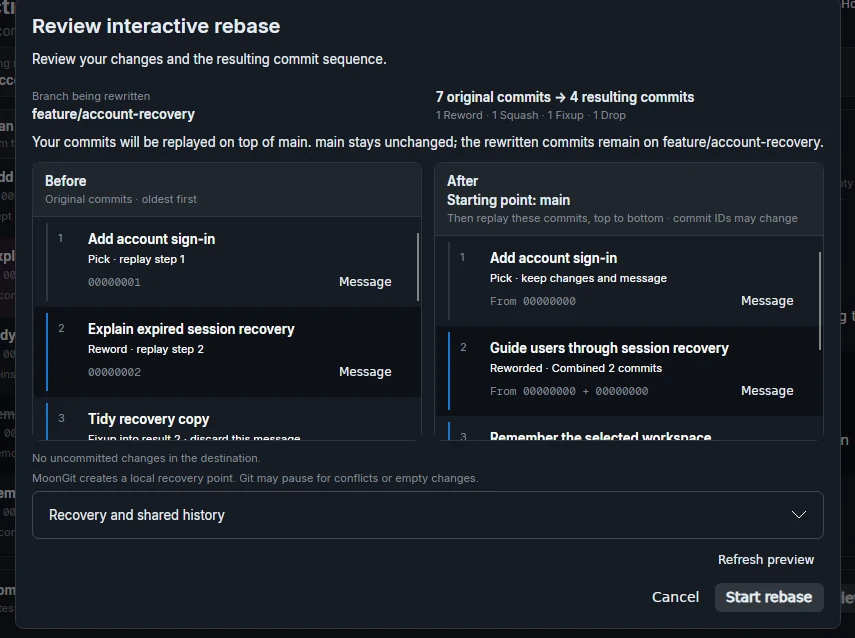
For the same plan in Git, run the following from the feature branch. Edit the todo list in the order displayed, changing pick to squash or fixup as needed.
git status -sb
git branch backup/search-before-rebase
git rebase -i main
If Git stops at a conflict, inspect the result and resolve it before continuing. You can also abort the rebase if the plan needs rethinking.
Check the commit subjects and the final tree
git log --reverse --format='%h %s' main..HEAD
git diff --exit-code backup/search-before-rebase HEAD
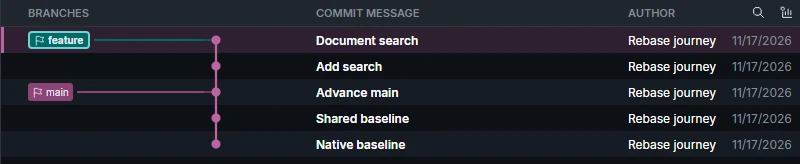
For this example the log should show the new search commit and the documentation commit. The diff should be empty when only the grouping and messages changed. Run the relevant tests as well. An unexpected diff is a reason to inspect what happened before publishing the rewrite.
If you discover an older tip you still need, see recovering a commit with reflog. Git’s interactive rebase documentation details the actions and message options.