 MoonGit
Work on two branches with Git worktrees
Create a second checkout for a hotfix or review while keeping your main working folder available.
When a worktree helps
A linked worktree is another folder for the same repository. Each checkout has its own working files and staging area. Both see the shared commit history and references. For example, leave an unfinished search change in C:\Dev\orbit and fix a production issue in C:\Dev\orbit-hotfix.
See multiple worktrees in one graph
MoonGit shows multiple worktrees together in one commit graph. You can follow their branch tips, working changes and connections without switching between separate history views. The Worktree column identifies the checkout associated with a row; a working-changes row belongs to that checkout, not every worktree in the repository.
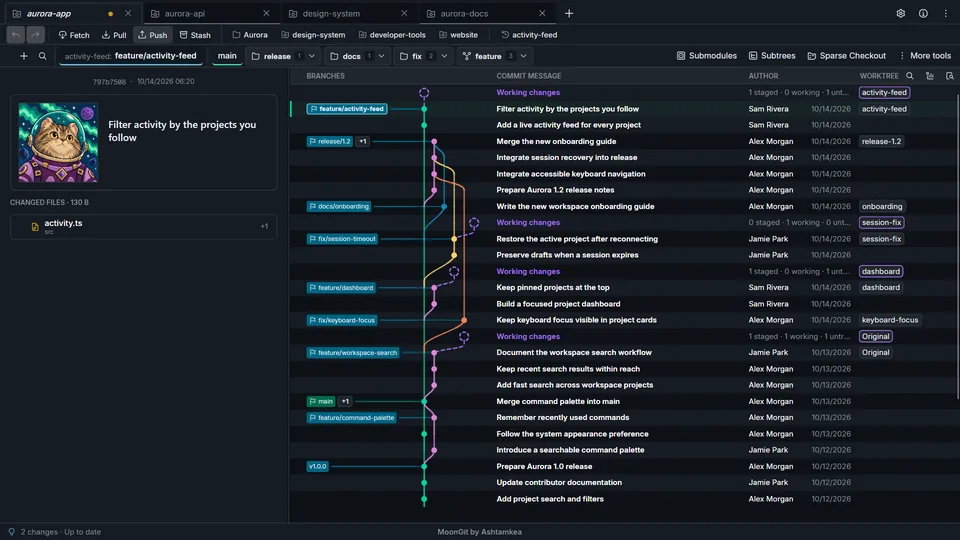
Use the graph to understand the shared history, then verify the active checkout's folder and branch before staging, committing or opening Git CLI. Each worktree still has its own working files and index. A visible branch label alone does not change where a command runs.
Manage the checkout folders
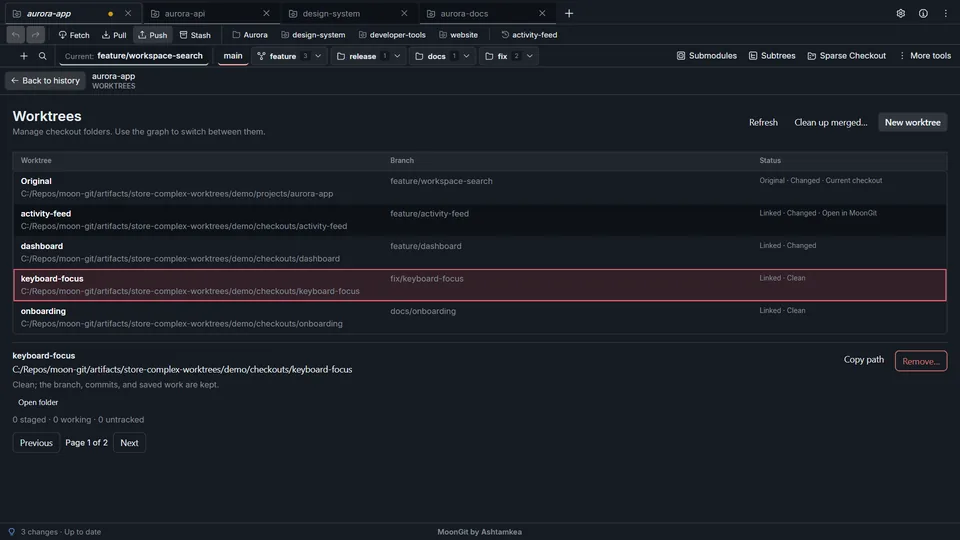
Create and open a checkout
- Open Worktrees in the repository. Enable it in Settings → Advanced features if the tool is hidden.
- Choose the starting branch, select Create a new branch, enter
hotfix/login, and choose the separate destination folder. - Select Create worktree. Open the new checkout and verify its branch and folder before staging. The unfinished changes remain in the original checkout.
Git generally prevents a branch from being checked out in two worktrees at once. Create a new branch from the same commit if you need both folders.
Retire a worktree safely
| Action | What to inspect |
|---|---|
| Remove… | Check the selected folder, changes, unfinished operations, and any ignored paths in the confirmation. Manual removal can delete the listed ignored files with the folder. |
| Clean up merged worktrees… | Verify the comparison branch and the selected folders in the preview. This cleanup keeps checkouts with ignored files. |
| Remove stale registrations… | Check that the folders are already gone. The cleanup removes their Git registrations. |
If MoonGit reports work in progress or an unverified checkout, open the affected folder and address that state before retrying.