 MoonGit
How to recover a lost Git commit with reflog
Find a previous branch tip after a reset, rebase, or branch deletion, preserve it with a recovery branch, and verify the recovered files.
You had a commit a few minutes ago, but it disappeared from the branch after a reset, a rebase, or deleting a branch. Git’s reflog records recent movements of local refs and HEAD. If it still records the old commit and the object is available, you can put that commit on a new branch and inspect it before changing your current branch. Git reflog reference
Find the movement that hid the commit
In MoonGit, open History & Recovery and look at Reflog. Start with the time around the operation. Read the messages around the reset or rebase and identify the entry that points to the tip you want. Open the candidate commit and inspect its files. If the same message appears twice after a rebase, look at its parent and changes as well as its subject.
A command-line check helps if you prefer to search the log as text.
git reflog --date=iso
git show --stat 'HEAD@{1}'
Use HEAD@{1} only if your reflog shows that it is the right entry. The number reflects recent movements in your own checkout. Quoting the selector keeps PowerShell from interpreting braces. Once you find the right entry, copy its commit ID so that subsequent ref movements do not change which commit you inspect.
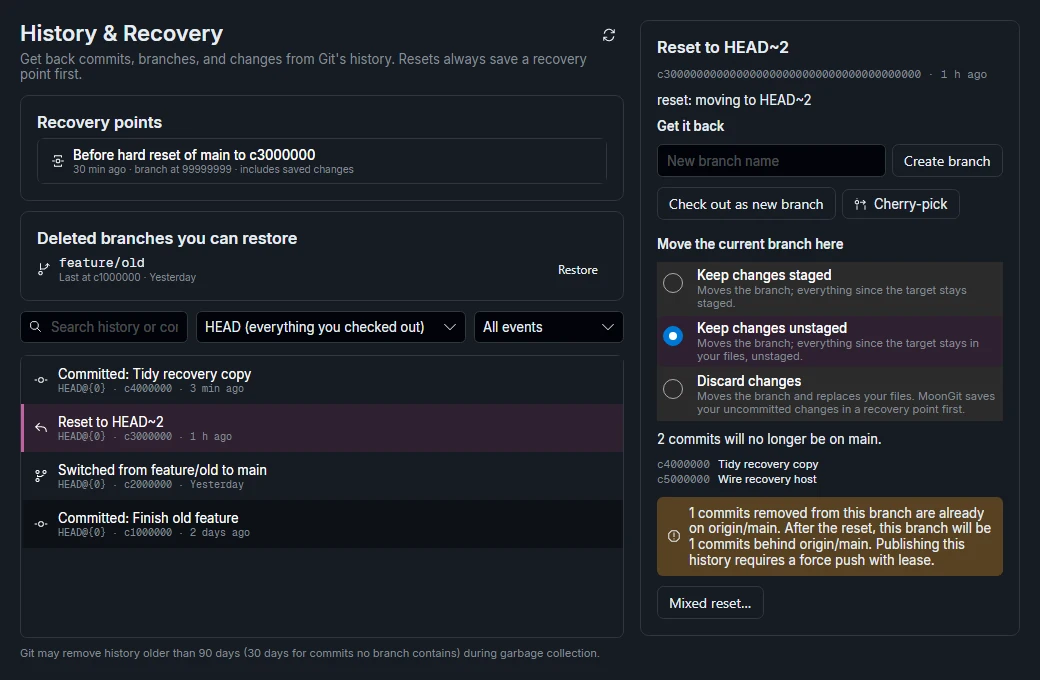
Preserve the old tip, then choose what to recover
Choose Create branch and give it a recognizable name such as recovery/search-before-reset. Creating a branch at the saved ID makes the commit reachable through that branch and lets you examine its history. You can do the same using Git by assigning the verified commit ID to $lost.
$lost = 'abcd1234'
git branch recovery/search-before-reset $lost
git log -1 recovery/search-before-reset
git show --stat recovery/search-before-reset
Compare the recovered branch to your current branch. A branch that moved back several commits may be most useful as a source for one cherry-pick. If you need the whole earlier line of work, inspect the recovered branch before switching to it. Leave the recovery branch in place until you have verified the intended files and tests.
Match the tool to what you lost
| You are looking for | Where to look |
|---|---|
| A commit you remember making | The reflog or another local or remote ref that still reaches it. |
| Edits you saved in a stash | The repository’s stash list and its destination checkout. |
| Files saved by a MoonGit operation | The recovery point for that operation and its restore preview. |
| Preferences or bookmarks | MoonGit’s profile backup or Saved Data. |
Reflogs are local and can expire. If the relevant ref is missing, ask whether another clone, backup, or remote still has the commit. An uncommitted file that was never saved through Git or another backup may never appear in the reflog.
Choose a recovery action in MoonGit · Move one recovered commit to another branch