 MoonGit
Clean up Git branches with MoonGit’s redesigned Branch Review
Preview how MoonGit separates merged, likely merged, and kept branches, then see what a cleanup records when it completes or stops partway.
Development preview. These screenshots show the redesigned Branch Review in a development build. Check the release notes for availability in your installed version.
After a release, a branch list can mix already-merged fixes, squash-merged work, open experiments, and branches still in use by another worktree. Branch Review lets you choose what to compare, examine evidence for each branch, and see what the cleanup actually did.
Pick the baseline that answers your question
Suppose the service team is retiring recent release work. Choose Local to review local branches or Remote to review the branches on a particular server. Check the baseline beside vs. To determine what reached release/1.8, compare against that branch rather than the development branch. Fetch the right remote when you need up-to-date remote references.
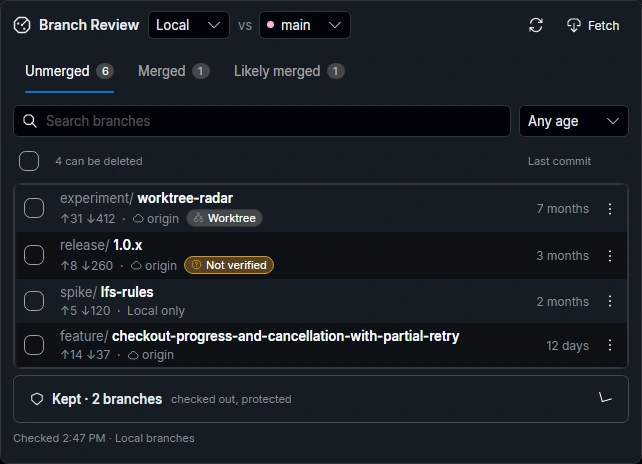
Merged means the chosen baseline contains the reviewed tip in its ancestry. Likely merged is a cue to look more closely, for example after a squash. Unmerged means the comparison has insufficient merge evidence. Open the branch tip in the graph and inspect the changed paths before deleting any branch whose history looks surprising. The Kept group includes protected or checked-out branches.
For a local ancestry check from Git, run this after updating remote refs. Substitute the baseline for your release.
git branch --merged origin/release/1.8
This only lists local branches with tips already reachable from that ref. See how to check ancestry and rewritten patches when a fix was picked or squashed.
Read the confirmation as a list of affected things
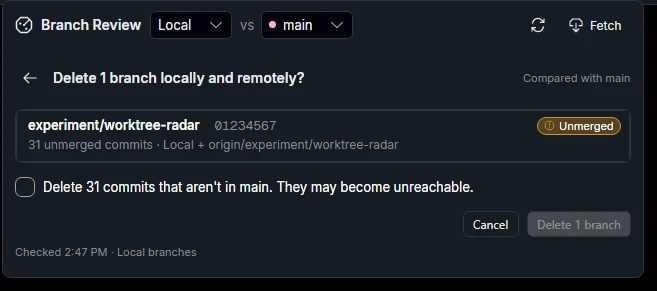
A local branch, a server branch, and a linked checkout are different resources. Check the actual names and paths in the confirmation. Review unmerged commits, dirty worktrees, and any ignored files you use to build or test. If you only want to retire the folder, start with removing a worktree safely. If you intend to delete a server branch, confirm it is no longer needed for reviews or automation.
Check what finished when you stop a batch
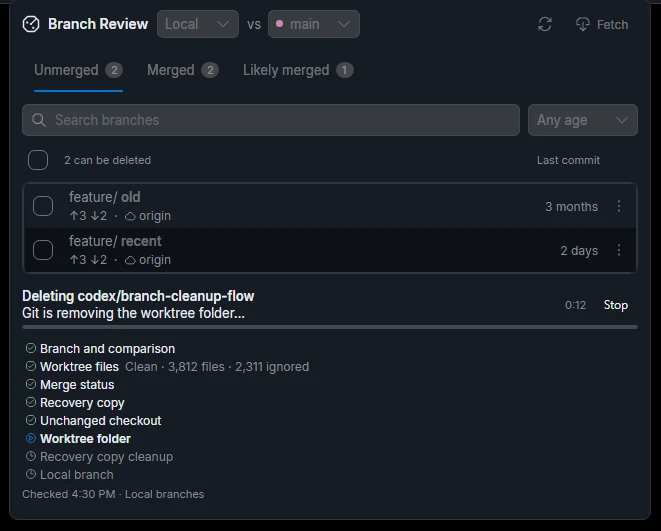
A larger operation can take time, especially when MoonGit needs to inspect or preserve worktree data. The activity list shows the current item, elapsed time, and each completed step. Stop ends remaining work after the current step is recorded.
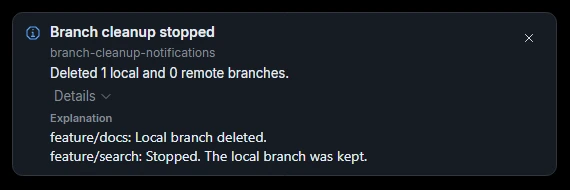
Open Details on the result and check the branches individually. In the example, feature/docs was deleted and feature/search was kept. Confirm the updated branch and Worktrees lists, and check any recovery location reported there before retrying. Resume only the work that still needs doing.
See the Branch Review guide for the controls and history and recovery if you need to recover a previous tip.