 MoonGit
 Integrations
Check which Git hosting editions support repository discovery and CI results in MoonGit, and see how to connect AI providers and local MCP clients.
MoonGit for Windows can browse repositories from six Git hosting services and show CI results from supported providers in the commit inspector. You can also connect an AI provider for commit-message drafts or enable access for a compatible local MCP client. The compatibility below was checked against Microsoft Store version 1.0.11.
Hosting and CI
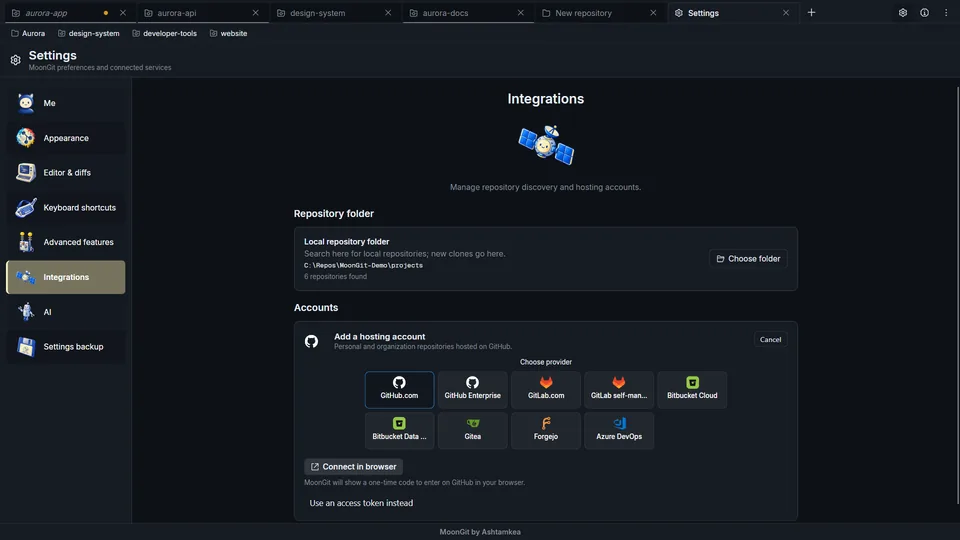
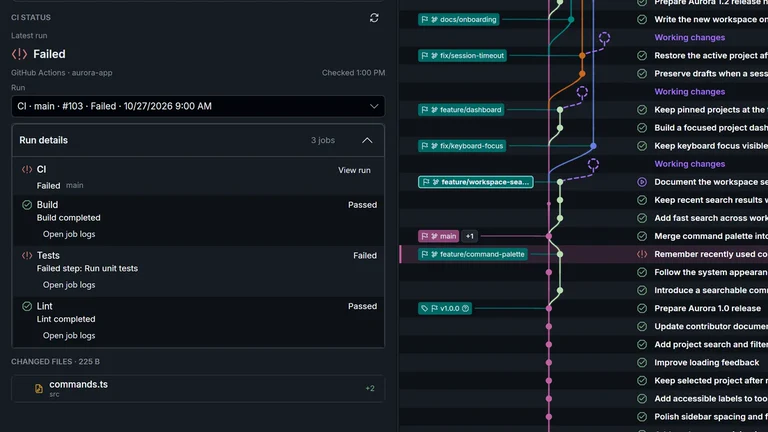
Use Settings → Integrations → Add account to connect your hosting service. Repository discovery lists repos your account can access so you can choose one to clone. CI support shows available runs and jobs for a selected commit, with step details when the provider exposes them. You can open the full logs on the provider’s site.
| Service and edition | Browse repositories | CI results in MoonGit |
|---|---|---|
| GitHub.com | Yes | GitHub Actions |
| GitHub Enterprise | Yes | GitHub Actions where available on the server |
| GitLab.com and self-managed GitLab | Yes | GitLab CI/CD |
| Bitbucket Cloud | Yes | Bitbucket Pipelines |
| Bitbucket Data Center | Yes | Repository discovery only |
| Azure DevOps Services | Yes | Azure Pipelines |
| Gitea | Yes | Gitea Actions with the run and job API |
| Forgejo, including Codeberg | Yes | Repository discovery only |
GitHub.com supports browser authorization using a device code. For self-managed services, enter your server URL and use the credentials requested by its account form. Enable CI / Post-processes under Settings → Advanced features before opening a commit’s CI results. The account needs access to the repository and its CI API, such as Actions: read for a fine-grained GitHub token or Build: Read for Azure DevOps Services. Cloning, fetching and pushing use credentials accepted by the repository’s HTTPS or SSH remote.
Connect a hosting account · Set up CI and inspect a failed check
AI commit messages
In Settings → AI, configure an OpenAI-compatible endpoint or an Anthropic provider. MoonGit sends staged filenames, change metadata and bounded diff excerpts to the configured provider when you request an editable commit-message draft. Review the draft and your staged files before committing. Provider pricing and data handling apply.
Configure AI commit-message drafts · See what the request includes
MCP clients
Enable MoonGit MCP in Settings → Advanced features to connect compatible local clients such as Codex and Claude Code. The Windows Store helper uses MCP over standard input and output. Clients running under your Windows account can request repository information, including working changes. Repository actions are read-only. Supported workspace actions can navigate and update bookmarks. Turn off MoonGit MCP in Settings to revoke that access.
Connect and disconnect an MCP client · Review MCP data access
Git and local tools
MoonGit uses Git for Windows and works with ordinary Git repositories, so you can open the same checkout from another Git client or a shell. Local history, diffs and commits work offline. Git supports HTTPS and SSH remotes. Install Git LFS separately to use its tracking and locking tools with a compatible remote.
Enable Git CLI to run Git commands in the selected worktree, or use External terminal to open a shell in that checkout. The integrations on this page use built-in provider connections, standard Git tools, or the optional MCP interface.